EMT Practice Test

1. Question Content...


Question List

Question1: With a room database. When performing queries, you'll often want your app's UI to update automatically when the data changes. Can you use a return value of type LiveData in your query method description to achieve this?

Question2: If you want the Database Inspector to automatically update the data it presents as you interact with your running app, check the Live updates checkbox at the top of the inspector window. While live updates are enabled, what happens with the table in the inspector window?

Question3: RecyclerView is a subclass of ViewGroup and is a more resource-efficient way to display scrollable lists. Instead of creating a View for each item that may or may not be visible on the screen, RecyclerView:

Question4: What method should we use with Notification.Builder to supply a PendingIntent to be sent when the notification is clicked?

Question5: As an example. In an Activity we have our TimerViewModel object (extended ViewModel), named mTimerViewModel. mTimerViewModel.timer method returns a LiveData<Long> value. What can be a correct way to set an observer to change UI in case if data was changed?

Question6: We have a custom view that extends android.widget.ProgressBar. Our progress bar is not touchable, focusable, etc.: it just shows progress. Style for our custom progress bar extends
"Widget.AppCompat.ProgressBar.Horizontal". An item, named "progressDrawable", in our style, is a xml file . What we usually can see as a main single element in this xml file:

Question7: In our TeaViewModel class, that extends ViewModel, we have such prorerty:
val tea: LiveData<Tea>
An observer in our Activity (type of mViewModel variable in example is TeaViewModel) is set in this way:
mViewModel!!.tea.observe(this, Observer { tea: Tea? -> displayTea(tea) }) What will be a correct displayTea method definition?

Question8: If you added to your build.gradle file a room.schemaLocation:
android {
defaultConfig {
javaCompileOptions {
annotationProcessorOptions {
arguments = ["room.schemaLocation": "$projectDir/schemas".toString
()]
}
}
}
}
Then, you build your app or module.
As a result you got a json file, with such path to it: app/schemas/your_app_package/db_package/DbClass/DB_VERSION.json What are the correct statements about this file? (Choose all that apply.)

Question9: Which build options in the Build menu to choose to delete all intermediate/cached build files.

Question10: A class that you create for managing multiple data sources. In addition to a Room database, this class could manage remote data sources such as a web server. It is about:

Question11: Choose the most correct statement.

Question12: Which statement is most true about layout_constraintLeft_toRightOf and layout_constraintStart_toEndOf constraints ?

Question13: Custom views and directional controller clicks. On most devices, clicking a view using a directional controller sends (to the view currently in focus) a KeyEvent with:

Question14: Enable debugging on your device: If you are using the emulator, this is enabled by default. But for a connected device, you need to

Question15: The Testing Pyramid, shown in the Figure, illustrates how your app should include the three categories of tests: small, medium, and large. Medium tests are integration tests that:

Question16: In application theme style, flag windowNoTitle (<item name="windowNoTitle">) indicates:

Question17: To create a basic JUnit 4 test class, create a class that contains one or more test methods. A test method begins with the specific annotation and contains the code to exercise and verify a single functionality in the component that you want to test. What is the annotation?

Question18: For example, we have a file in our assets folder app/src/main/assets/sample_teas.json. To get an InputStream for reading it, from out Context context, we can try doing this:

Question19: For example, we have a BufferedReader reader, associated with the json file through InputStreamReader. To get a file data we can do this:

Question20: Custom views and directional controller clicks. In general, you should send an AccessibilityEvent whenever the content of your custom view changes. For example, if a text value was changed in your custom view, you should emit an event of this type:

Question21: In a class PreferenceFragmentCompat. What method is called during onCreate(Bundle) to supply the preferences for this fragment. And where subclasses are expected to call setPreferenceScreen (PreferenceScreen) either directly or via helper methods such as addPreferencesFromResource (int)?

Question22: The following code snippet shows an example of an Espresso test:

Question23: The following code snippet shows an example of an Espresso test:

Question24: What is demonstrated by the code below?
// RawDao.java
@Dao
interface RawDao {
@RawQuery
User getUserViaQuery(SupportSQLiteQuery query);
}
// Usage of RawDao
...
SimpleSQLiteQuery query =
new SimpleSQLiteQuery("SELECT * FROM User WHERE id = ? LIMIT 1",
new Object[]{userId});
User user = rawDao.getUserViaQuery(query);
...

Question25: Android Tests. You can use the childSelector() method to nest multiple UiSelector instances. For example, the following code example shows how your test might specify a search to find the first ListView in the currently displayed UI, then search within that ListView to find a UI element with the text property Apps.
What is the correct sample?

Question26: @Query is the main annotation used in DAO classes. It allows you to perform read/write operations on a database. Each @Query method is verified at compile time, so what happens if there is a problem with the query?

Question27: If constant LENGTH_INDEFINITE is used as a parameter for the setDuration method in Snackbar, what will happen?

Question28: If you want get a debuggable APK that people can install without adb, in Android Studio you can:

Question29: Android uses adapters (from the Adapter class) to connect data with View items in a list. There are many different kinds of adapters available, and you can also write custom adapters. To connect data with View items, the adapter needs to know about the View items. From what is extended the entity that is usually used in an adapter and describes a View item and its position within the RecyclerView?

Question30: To automate UI tests with Android Studio, you implement your test code in a separate Android test folder. Folder could be named:

Question31: Filter logcat messages. If in the filter menu, a filter option "Show only selected application"? means:

Question32: In a class extended PreferenceFragmentCompat. What method is used to inflate the given XML resource and add the preference hierarchy to the current preference hierarchy?

Question33: What is illustrated in the picture?

Question34: For example, our preferences.xml file was added by addPreferencesFromResource (R.xml.preferences). Our preferences.xml file contains such item:
<ListPreference android:id="@+id/order_by" android:key="@string/pref_sort_key" android:title="@string/pref_sort_title" android:summary="@string/pref_sort_summary" android:dialogTitle="@string/pref_sort_dialog_title" android:entries="@array/sort_oder" android:entryValues="@array/sort_oder_value" android:defaultValue="@string/pref_default_sort_value" app:iconSpaceReserved="false" /> In our Fragment, we can dynamically get current notification preference value in this way:

Question35: Select a correct statement about PagedList.

Question36: If content in a PagedList updates, the PagedListAdapter object receives:
Question37: In application theme style, flag windowActionBar (<item name="windowActionBar">) indicates:

Question38: Filter logcat messages. If in the filter menu, a filter option "Edit Filter Configuration"? means:

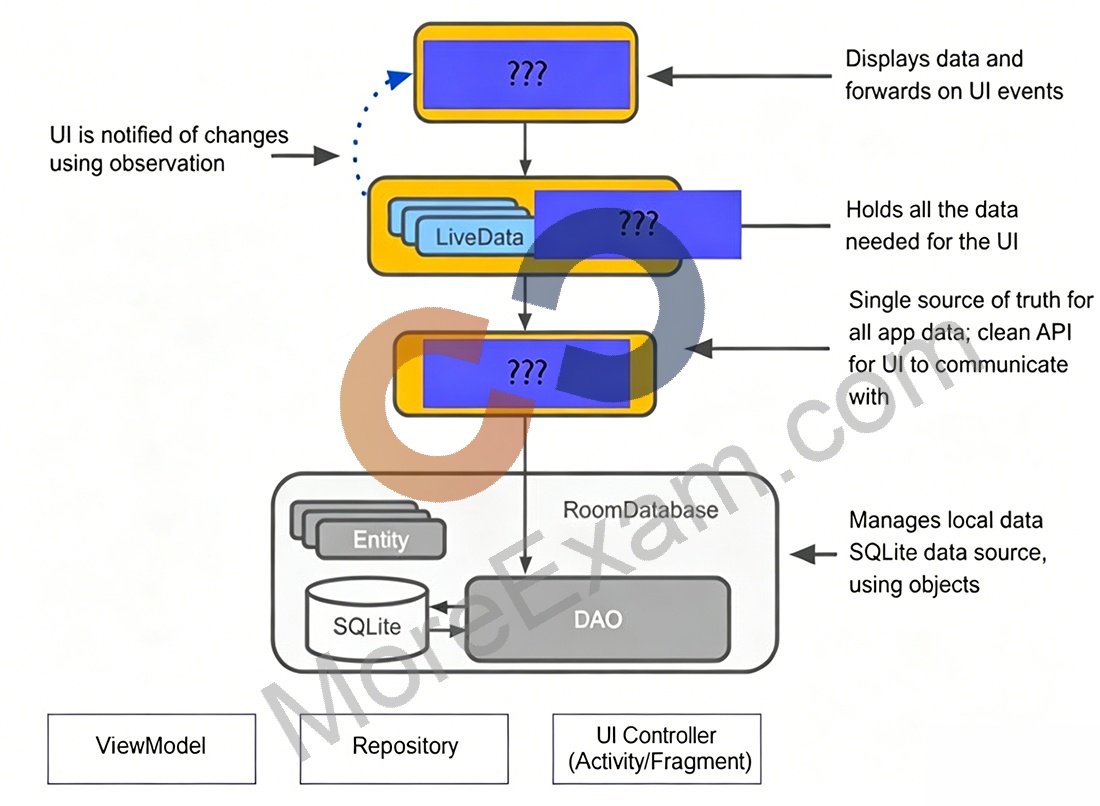
Question39: The diagram below shows a basic form of the recommended architecture for apps that use Architecture Components. The architecture consists of a UI controller, a ViewModel that serves LiveData, a Repository, and a Room database. Drag modules to correct places.

Question40: In Android 8.0, API level 26, some APIs regarding notification behaviors were moved from Notification to NotificationChannel. For example, what should we use instead of NotificationCompat.Builder.setPriority() for Android 8.0 and higher?